# 16 ways to make your daily stand-up better  with LinearB | LinearB Blog

> Visualize progress, show WIP and completed work, and flag high-risk code to make your daily standup worth the time.

_This is a markdown rendering of a live HTML page on linearb.io, generated for AI/LLM consumption — it is not a markdown-only site. To get the full HTML page instead, request this URL with an explicit `Accept: text/html` header (no wildcard, no markdown preference)._

[Blog](https://linearb.io/blog)

/

16 ways to make your daily stand-up better with LinearB

# 16 ways to make your daily stand-up better with LinearB

![Photo of Boaz Dremer](https://assets.linearb.io/image/upload/c_limit,w_2560/f_auto/q_auto/v1/logo-mark-lg?_a=BAVMn6ID0)

By [Boaz Dremer](https://linearb.io/blog/make-daily-better#boaz-dremer)

|

September 21, 2020

![Group_1089_83d68ec4e9](https://assets.linearb.io/image/upload/c_limit,w_2560/f_auto/q_auto/v1/Group_1089_83d68ec4e9?_a=BAVMn6ID0)

LinearB Pulse correlates and analyzes Git activity, matching project issues, and team interactions creating the ideal project delivery board for dev teams.

[](https://linearb.io/get-started-linearb/)

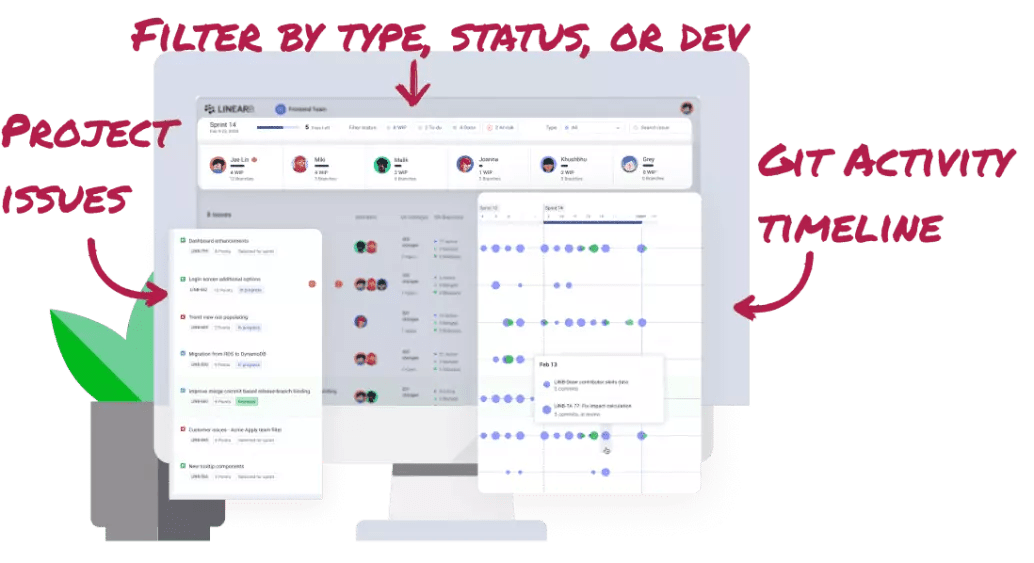
Pulse shows the project issues and related Git work for each team member to help you run a faster, more dev-friendly daily stand-up meeting. The Pulse daily devboard automatically:

* Shows completed work and WIP for each dev so you spend less time on status updates.
* Flags high-risk branches and blocked PRs so you can get help for everyone who needs it.
* Visualizes progress, risks and blockers for dev work in the context of the relevant project issue so you can predict if you’re going to hit your delivery deadlines.

## **Here’s 16 tips for using LinearB Pulse to run your most efficient stand-up ever:** 

Look for the ⚡️LIGHTNING BOLT⚡️ symbol for advanced tips.

### **How to use LinearB before your stand-up**

#### **1) ⚡️Get updates from the last 24 hours**

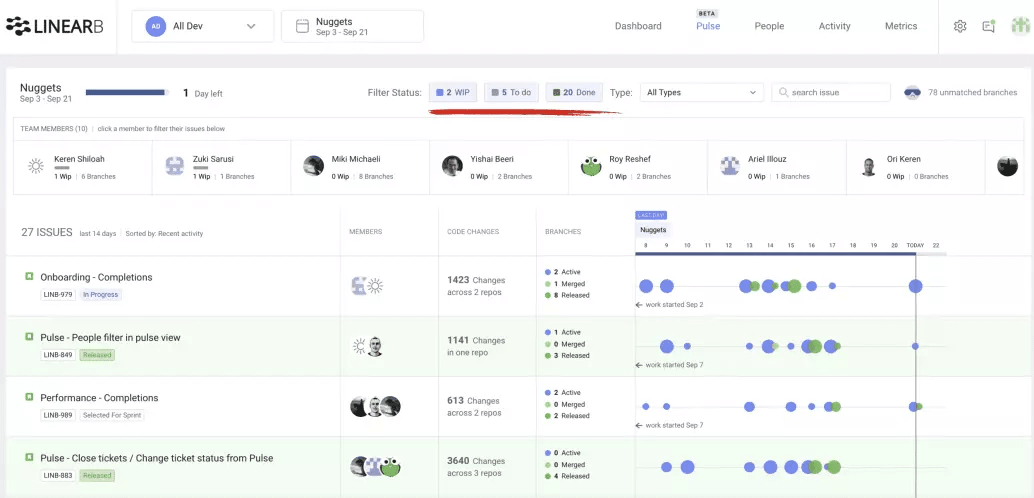
Open Pulse for five minutes before your stand-up each day to review progress from the last 24 hours. Use the “Done” filter to see work that has been completed and the “WIP” filter to see work in progress. This will allow you to spend less time in the stand-up discussing status updates and more time focusing on who needs help and who needs to connect after the meeting.
### **How to use LinearB during your stand-up:**

#### **2)⚡️Start with high-risk code and blocked PRs**

Start your meeting on the “Team Dashboard” to see “Notifications” about branches with high-risk code and blocked PRs.
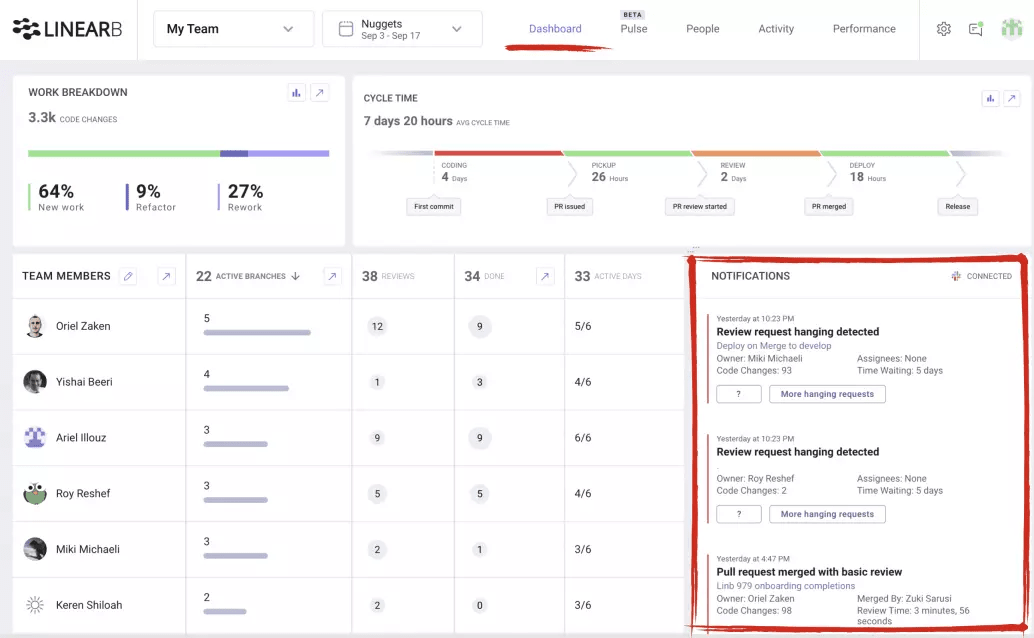
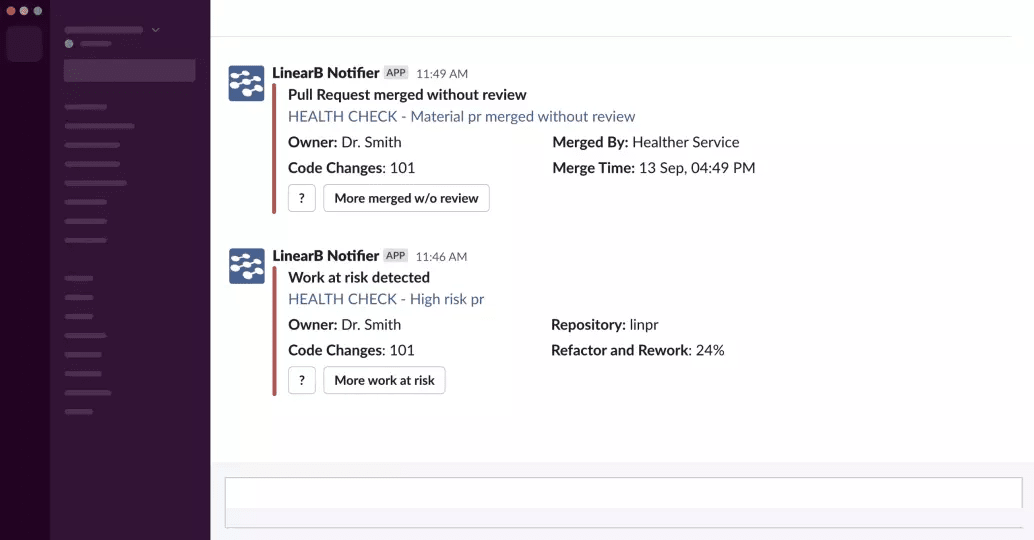
LinearB analyzes Git logs to predict future production quality issues. We also flag PRs merged without review, PRs that have not been picked up for review, PRs with abnormally high review time and PRs with abnormally high back and forth interaction. 

Reviewing these notifications at the beginning of your meeting ensures status updates don’t take time away from discussing who needs help. 

#### **3) ⚡️ Check your WIP balance across the team** 

While you’re in the Team Dashboard, you can see how many active branches each team member has, how many reviews they’ve done in the current iteration and how many days they’ve been active. You can easily see when workload is not balanced across team members or when one of your devs is at risk for burnout. 
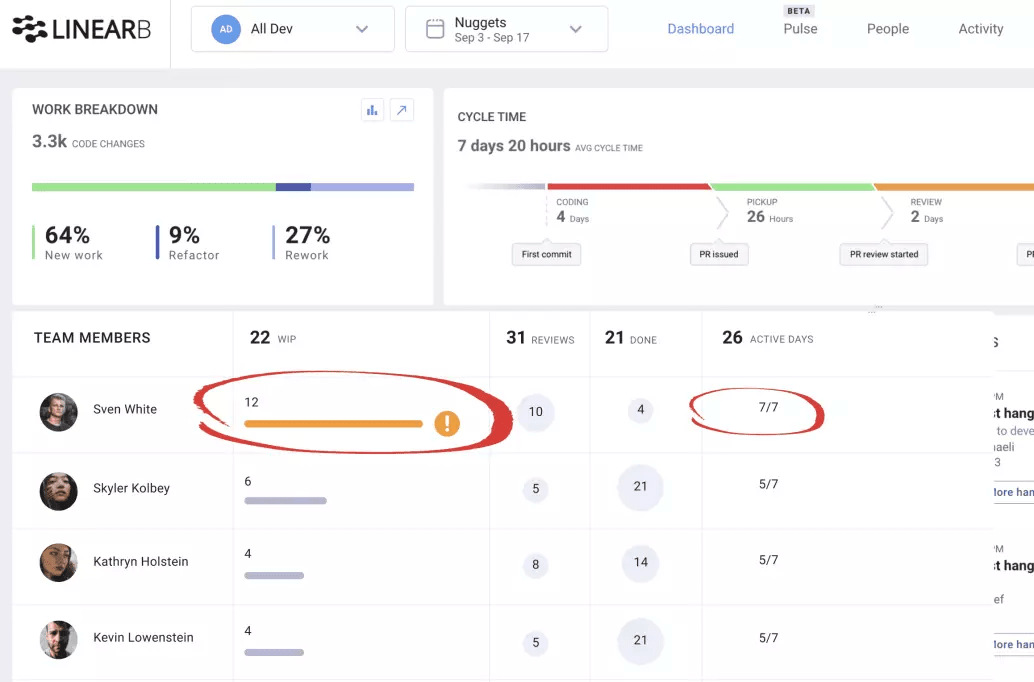
Knowing when team members are over or underutilized helps you understand risks to your delivery deadline. 

---

Discover how it feels to run your daily stand-up with LinearB. 

[Get LinearB Free today >>](https://app.blog.linearb.io/register)

---

#### **4)** ****Announce the number of days left in your iteration** 

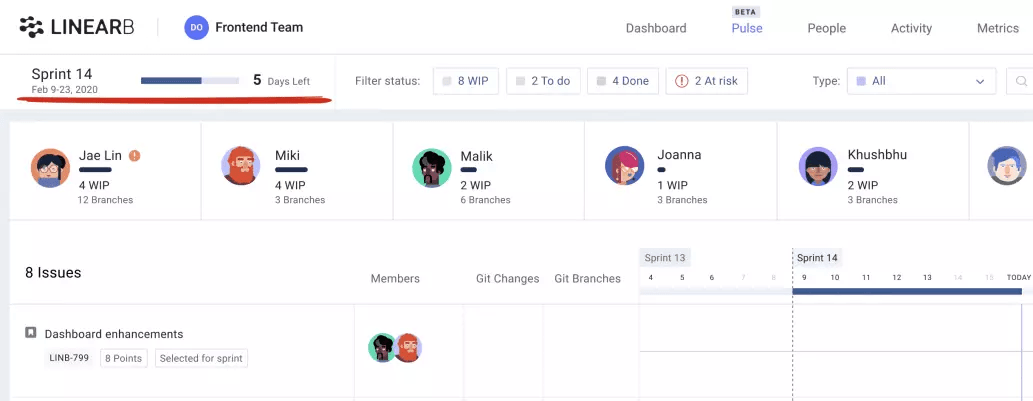
Announcing the number of days left in your iteration at the beginning of the daily helps focus your discussion around “are we going to deliver on time?” Click in to Pulse and you’ll see this in the top left corner of the screen.
#### **5) Look at issues and the related Git work for specific team members**

Click the avatar to filter by “Member” and see just the issues and Git Activity Timeline for that specific team member.

#### **6)⚡️ Check for context switching**

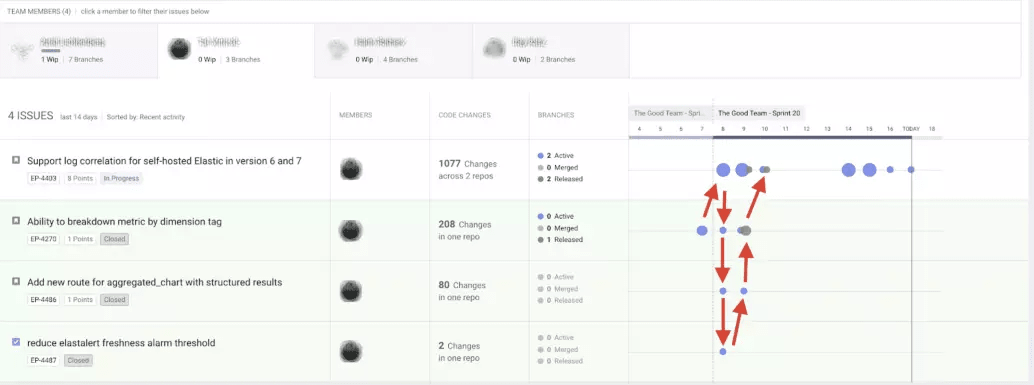
Context switching can hurt your devs ability to go deep into specific customer use cases and may stop them from doing their best work. The Git Activity Timeline helps you visualize if someone is bouncing around between work or has too much work. Look for the following possible warning signs:  

* Git activity dots across multiple issues in the same day or week.
* Git activity dots in issues that are not central to your core iteration success criteria.
#### **7) ⚡️ Look for dependencies between developers** 

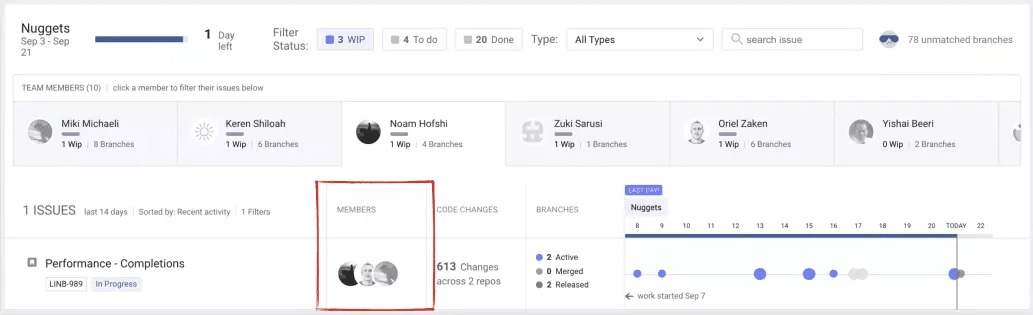
The “Member” column helps you see how each team member’s work relates to projects (e.g. features and bugs). When clicking through each team member and hovering over specific branches and PRs, pay attention to the other team members working on the same issues to uncover dependencies that could lead to delays.
#### **8) Review “Git Activity Timeline” to see recent progress**

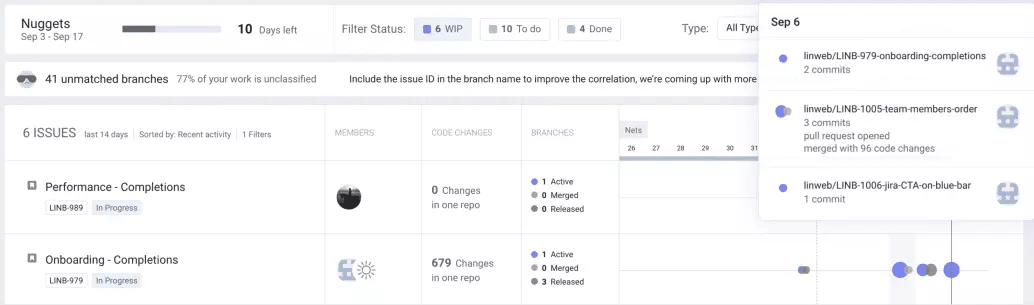
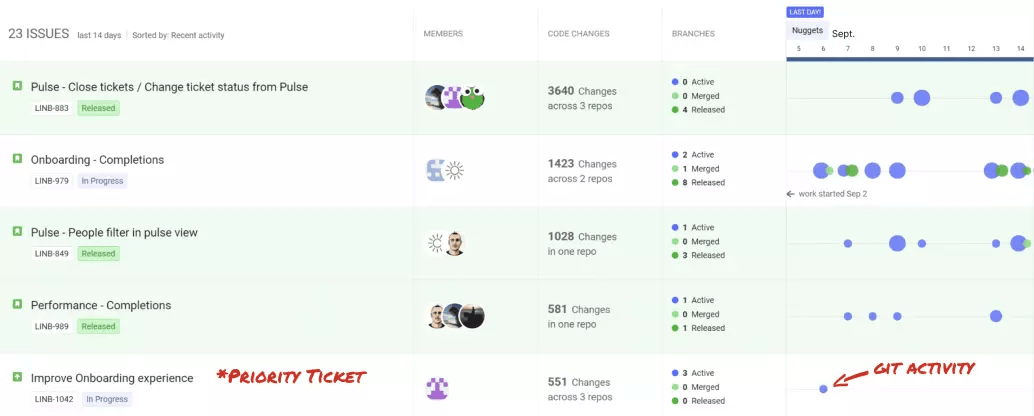
The hover feature helps you see details for branches and PRs correlated to project issues. This allows you to see actual dev work and not just project issue status. Blue dots represent branch commits and green dots represent PR reviews and merges. These dots help you visualize how your team is working together to ultimately deliver the features and fix the bugs you care about. 
#### **9)   Find outdated project management statuses**

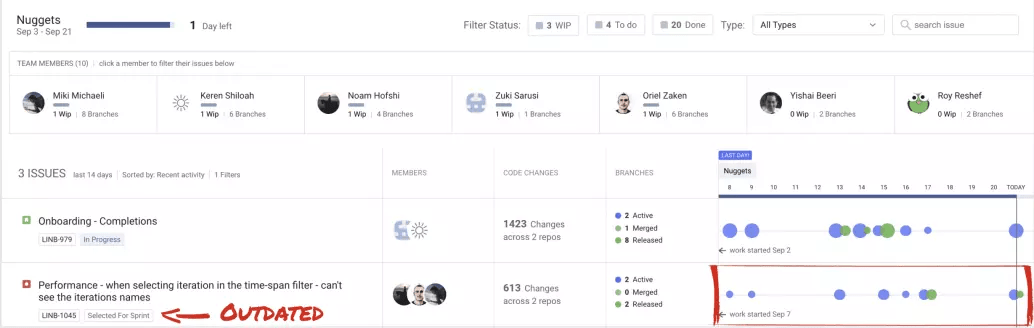
You can easily see when your project management tool status is not up to date by comparing the project status to the Git activity status and Git Activity Timeline. For example, if an issue is marked “Selected for Sprint” but you see dots on the timeline, that means work in Git has actually started and your project management tool is outdated.

---

Ready to start using LinearB Pulse for your daily? 

[Sign-Up Free here >>](https://app.blog.linearb.io/register)

---

#### **10) Update your project management status directly from LinearB**

When you see a discrepancy in status, you can update your project management tool directly from LinearB with two clicks. Use “Pulse Actions” to update your “Project Status” directly from LinearB.

#### **11)   Look at completed work and work-in-progress** 

Filter by “Done” and “WIP” to see completed work and work in progress**.** Issues marked as “Done” in your project tool are highlighted in green so can spot them easily even when the “Done” filter is not engaged.

#### **12) Filter by “To do” to see issues that have not been started**

Quickly see issues that have not been started and compare against the number of days left in your iteration and the amount of WIP across the team so you can communicate early with your business if you need to remove items from your iteration.

#### **13)⚡️ Find priority issues that aren’t getting attention**

“In Progress” state in your project management system doesn’t always mean an issue is getting the full attention it needs from the team. Use the Git Activity Timeline to visualize where your team is really spending their time and if your priority issues are getting the focus they need.  
### **How to use LinearB after your stand-up:** 

#### **14)⚡️ Enable Slack alerts to see high-risk and blocked work in real-time**

Don’t wait until your stand-up to find out your team needs help. Activate LinearB Slack alerts, get notified about high-risk code and blocked PRs in real-time and jump in to help with one click.

---

Did someone say automated high-risk code Slack Notifications?

We did! Enable high-risk Slack Alerts with a LinearB free account.

[Sign Me Up >>](https://app.blog.linearb.io/register/)

---

#### **15)   See how non-planned items are impacting your iteration** 

Use the “Type” filter to drill into specific issue types like bugs to see how these (typically) non-planned items are affecting your delivery scope and how much effort is allocated there. 

#### **16) **Keep your Product Manager up to date**

Help your product management team and business stakeholders stay up to date with your team’s progress by inviting them to LinearB and linking them to the Pulse devboard each day. They’ll get the information they need to make decisions without interrupting your devs. 
## Improve developer productivity with LinearB

Find us on

[](https://www.linkedin.com/company/linearb)
[](https://devinterrupted.substack.com/)

## Your next read

[![Cover image for AI ROI comes from measuring engineering outcomes on day one](https://assets.linearb.io/image/upload/c_limit,w_2560/f_auto/q_auto/v1/Blog_AI_ROI_comes_from_measuring_engineering_software_security_2400x1256_2c5eae0862?_a=BAVMn6ID0)](https://linearb.io/blog/kraken-nik-sudan-measure-ai-roi-engineering-outcomes)

Product

[AI ROI comes from measuring engineering outcomes on day one](https://linearb.io/blog/kraken-nik-sudan-measure-ai-roi-engineering-outcomes)

Kraken Engineering Operations Lead Nik Sudan details how to establish day-one data infrastructure to accurately measure AI ROI. Discover why raw token adoption...

[![Cover image for Best Appfire Flow alternatives in 2026](https://assets.linearb.io/image/upload/c_limit,w_2560/f_auto/q_auto/v1/Blog_Moving_beyond_flow_88c071e703?_a=BAVMn6ID0)](https://linearb.io/blog/flow-alternatives-2026)

Product

[Best Appfire Flow alternatives in 2026](https://linearb.io/blog/flow-alternatives-2026)

Flow provides DORA metrics, workflow diagnostics, and useful dashboards for engineering leadership. But it has real limitations, and the market has moved...

[![Cover image for 8 million pull requests reveal where engineering productivity breaks down](https://assets.linearb.io/image/upload/c_limit,w_2560/f_auto/q_auto/v1/Blog_8_million_pull_requests_2400x1256_03724bfbb2?_a=BAVMn6ID0)](https://linearb.io/blog/8-million-prs-engineering-productivity)

Product

[8 million pull requests reveal where engineering productivity breaks down](https://linearb.io/blog/8-million-prs-engineering-productivity)

8.1M pull requests reveal the gap between AI adoption and engineering impact, and why code review is the bottleneck blocking real productivity gains.

## Structured data

_Machine-readable metadata (JSON-LD) embedded in the page for search/AI context — not content rendered on the page itself._

```json
{
  "@context": "https://schema.org",
  "@type": "Organization",
  "name": "LinearB",
  "url": "https://linearb.io",
  "logo": "https://assets.linearb.io/image/upload/v1715628027/logo-mark-lg.svg",
  "description": "LinearB is the engineering productivity platform that helps engineering leaders prove AI is improving throughput without sacrificing delivery confidence, flow efficiency, or developer experience.",
  "sameAs": [
    "https://www.linkedin.com/company/linearb"
  ],
  "award": [
    {
      "@type": "Award",
      "name": "LinearB is a Leader in the 2026 Gartner® Magic Quadrant™ for Developer Productivity Insight Platforms",
      "dateAwarded": "2026",
      "awardedBy": {
        "@type": "Organization",
        "name": "Gartner®"
      }
    },
    {
      "@type": "Award",
      "name": "Great Place to Work Certification",
      "dateAwarded": "2025-2027",
      "awardedBy": {
        "@type": "Organization",
        "name": "Great Place to Work"
      }
    },
    {
      "@type": "Award",
      "name": "America's Best Startup Employers 2025",
      "dateAwarded": "2025",
      "awardedBy": {
        "@type": "Organization",
        "name": "Forbes Magazine"
      }
    }
  ],
  "hasCertification": [
    {
      "@type": "Certification",
      "name": "SOC 1 Type 2"
    },
    {
      "@type": "Certification",
      "name": "SOC 2 Type 2"
    },
    {
      "@type": "Certification",
      "name": "GDPR Compliance certification"
    },
    {
      "@type": "Certification",
      "name": "ISO 27001"
    }
  ]
}
```

```json
{
  "@context": "https://schema.org",
  "@type": "Article",
  "headline": "16 ways to make your daily stand-up better  with LinearB",
  "url": "https://linearb.io/blog/make-daily-better",
  "author": {
    "@type": "Person",
    "name": "Boaz Dremer"
  },
  "datePublished": "2020-09-21T23:23:44.000Z",
  "dateModified": "2020-09-21T23:23:44.000Z",
  "image": "https://assets.linearb.io/image/upload/v1720000000/Group_1089_83d68ec4e9.png",
  "publisher": {
    "@type": "Organization",
    "name": "LinearB",
    "logo": "https://assets.linearb.io/image/upload/v1777485755/linearb-logo-2026.png"
  },
  "description": "Visualize progress, show WIP and completed work, and flag high-risk code to make your daily standup worth the time.\n"
}
```

## More on linearb.io

### Top navigation

- [Book a Demo](https://linearb.io/book-a-demo)
- [AI Code Reviews — Catch security risks, bugs, and spec mismatches](https://linearb.io/platform/ai-code-reviews)
- [AI & Productivity Insights — See how AI tools affect cycle time and delivery speed](https://linearb.io/platform/ai-developer-productivity-insights)
- [Measure AI Impact — Track AI adoption and tie it to delivery outcomes](https://linearb.io/use-case/measure-ai-impact)
- [MCP Server — Chat with your data to spot patterns and boost output](https://linearb.io/platform/mcp-server)
- [Resource Allocation — Cost initiatives and shape your investment strategy](https://linearb.io/platform/resource-allocation)
- [Cost Capitalization — Capitalize engineering costs with audit-ready reports](https://linearb.io/platform/cost-capitalization)
- [Dev Team Management — Set targets and tie throughput to business outcomes](https://linearb.io/platform/goals-and-reporting)
- [DevOps Workflow Automation — Policy-based PR routing, approvals, and tests](https://linearb.io/platform/ai-workflow-governance)
- [AI Powered Support — Unify AI and human code delivery in one clear view](https://linearb.io/use-case/ai-powered-support)
- [Optimization — Surface friction with feedback and MCP insights](https://linearb.io/platform/developer-experience)
- [Reporting — Spot what's working and what needs attention](https://linearb.io/use-case/measuring-developer-experience)
- [Surveys — Turn developer feedback into actionable signals](https://linearb.io/platform/developer-surveys)
- [Platform overview](https://linearb.io/platform/overview)
- [Register now](https://linearb.io/event/engineering-productivity-gap)
- [Customers](https://linearb.io/customers)
- [Pricing](https://linearb.io/pricing)
- [Why choose LinearB — Explore your data. Measure performance. Act to improve it.](https://linearb.io/why-linearb)
- [APEX framework — The operating model for AI-era engineering teams](https://linearb.io/resources/apex-framework)
- [Anti-FAQ — The questions other vendors won't answer](https://linearb.io/why-linearb/anti-faq)
- [Security — Enterprise-grade compliance and zero code access](https://linearb.io/security)
- [Build vs. buy — The hidden cost of building it yourself](https://linearb.io/resources/build-vs-buy)
- [Dev Interrupted Podcast — Conversations with engineering leaders](https://linearb.io/dev-interrupted/podcasts)
- [Reports & Guides — Deep dives on productivity and delivery](https://linearb.io/resources)
- [Webinars — Expert sessions on productivity and AI](https://linearb.io/resources?category=workshops)
- [Metrics Benchmarks — See how your engineering org stacks up](https://linearb.io/resources/software-engineering-benchmarks-report)
- [Blog — Product updates and practical insights](https://linearb.io/blog)
- [Help Center — Documentation, setup, and support](https://linearb.helpdocs.io)
- [API Docs](https://docs.linearb.io/api-overview)
- [Status](https://www.linearbstatus.com/)
- [Integrations](https://linearb.io/integrations)
- [LinearB is a Leader in the 2026 Gartner® Magic Quadrant™ for Developer Productivity Insight Platforms](https://linearb.io/resources/gartner-magic-quadrant-dpi-platforms-2026)
- [Sign in](https://app.linearb.io/login)
- [Enterprise](https://linearb.io/solutions/enterprise)
- [Contact](https://linearb.io/contact-us)
- [About us](https://linearb.io/about-us)
- [Careers](https://linearb.io/careers)
- [Service agreement](https://linearb.io/services-agreement)
- [Privacy policy](https://linearb.io/privacy-policy)
- [DPA](https://linearb.io/data-processing-agreement)
- [Security FAQ](https://linearb.io/security-faq)
- [Substack](https://devinterrupted.substack.com/)

### Footer

_Additional links from the site footer, not repeated from the top navigation above._

- [GitHub](https://github.com/linear-b)
- [LinkedIn](https://www.linkedin.com/company/linearb)
- [Twitter](https://twitter.com/LinearB_Inc)