Six questions to ask your engineering data

Summary
- Six playbooks, each a fixed sequence of three or four questions you ask through the LinearB MCP server, with the shape to look for and the change to make.
- Three run weekly (review load, agentic vs. manual wait time, weekend work) and three run monthly (reviewer coverage, unplanned work, PR readiness).
- Agentic pull requests wait 5.3x longer for pickup than manual ones, and the first cause LinearB traced is that nobody owns them (2026 Benchmarks Report).
- Elite teams keep PR maturity above 89%; below 77%, reviewers are spending their time on rework instead of review.
- Connecting the MCP server takes three steps, and every answer respects your existing LinearB permissions.
The six questions to ask your engineering data are the ones that find who is carrying your review load, how long agent-authored work waits, where hours spill into the weekend, which reviewers your codebase cannot lose, whether agents are adding unplanned work, and which teams send pull requests before they are ready. Each is a playbook you run in plain language through the LinearB MCP server: ask three or four questions in order, read the shape of the answer, change one thing, and check next month whether it worked. According to LinearB's 2026 Software Engineering Benchmarks Report, agentic pull requests wait 5.3x longer for pickup than manual ones and elite teams keep PR maturity above 89%, so each playbook comes with the benchmark that tells you whether your answer is a problem.
The playbooks stand on their own, so start with whatever your software factory is showing you right now. Three run weekly and three run monthly, and the final section turns them into a weekly health check your leadership team can read. Updated November 2026.
An engineering data playbook is a fixed sequence of questions you ask your git and ticket data, the shape of answer to look for, the change to make, and the metric that confirms the change worked. Run through the LinearB MCP server, every answer respects your existing LinearB permissions.
Pick the playbook for the problem you're seeing
Every playbook follows the same five steps: run it when a trigger appears, ask the questions in order, read the answer, change one thing, and check it worked. Match what your factory is showing you to the playbook that answers it.
| If you're seeing | Run this playbook | Cadence |
|---|---|---|
| The same few people approve everything | 1. See who is carrying your review load | Weekly |
| Agent pull requests sit in the queue | 2. Compare how long agentic and manual work waits | Weekly |
| Commits landing on Saturdays and Sundays | 3. Catch work spilling into the weekend | Weekly |
| One reviewer is out and a repository stalls | 4. Find the reviewers your factory can't lose | Monthly |
| Sprints keep filling with work nobody planned | 5. Check whether agents are adding unplanned work | Monthly |
| Reviews keep turning into rework | 6. See which teams send work before it's ready | Monthly |
New to the MCP server? Setup takes three steps, covered at the end of this guide. Questions that name individual people depend on what your LinearB role can see.
Playbook 1: see who is carrying your review load
Run weekly. Signal: reviewer imbalance. Runs through the LinearB MCP server.
Run it when: review volume is climbing faster than the number of people doing it, or agents are adding more pull requests to the queue.
Ask, in order
- “Who carried the most review load across my teams this month, and how does that compare with last month?”
Look for the same names at the top month after month. - “How many more reviews did the busiest 20% of reviewers do each week than everyone else over the last quarter?”
Look for a gap that widens week over week. - “Which repositories did those reviewers spend the most review time in this quarter?”
Look for a few repositories that only they review. - “Who else reviewed pull requests in those repositories this quarter?”
Look for people who could take a share of the load.

Read the answer
- The same names stay on top. Review work is concentrating, and the engineers it concentrates on are the senior ones whose judgment the team already leans on.
- See how far it has gone. Reviewer imbalance on the engineering health dashboard compares the busiest 20% of reviewers with everyone else, week by week.
Change it
Route review by ownership. In gitStream, turn on Assign reviewers by directory and Assign code experts.
Check it worked
Ask again next month. Reviewer imbalance comes down week over week, and agentic pull requests get picked up about as fast as manual ones.
What to do next: run Playbook 2 (agentic wait time) and Playbook 4 (reviewer coverage) on the same repositories.
Playbook 2: compare how long agentic and manual work waits
Run weekly. Signal: pickup time. Runs through the LinearB MCP server.
Run it when: agents are opening pull requests on your teams, or agentic pull requests merge at a lower rate than manual ones.
Ask, in order
- “How long do our agentic pull requests wait for pickup compared with manual ones, by team?”
Look for agentic pickup time climbing while manual pickup holds steady. - “How does the acceptance rate of our agentic pull requests compare with manual ones, by team?”
Look for the teams where agentic work trails manual work the most. - “Show me the pull requests behind the slowest team's number.”
Look for who, if anyone, owns each one.

Read the answer
- No one owns them. The first cause LinearB traced behind the 5.3x longer wait in the 2026 Software Engineering Benchmarks Report.
- They're backlog work. Agentic flows pointed at low-priority backlog work sit in the queue.
- They're large. Reviewers hesitate on larger, more complex AI pull requests, which run 2.6x the size of unassisted ones.
Change it
Name an owner first. Set the owner when the agent's task is assigned, so the pull request lands with someone already on the hook. For low-risk agent changes, gitStream's Approve safe changes and Approve tiny changes clear them without waiting for pickup, while Review sensitive files and Additional review for large PRs keep humans on the rest. The reasoning behind the ownership rule is in who is holding up your AI-generated code.
Check it worked
Compare the rates. Acceptance rate on agentic pull requests moves closer to your manual rate, and fewer sit open past 30 days. With the LinearB API (Business and Enterprise plans), group by agentic_pr with a one-week roll-up on branch.time_to_review at p75, filtering agentic_pr to all and manual.
What to do next: if the slowest team's pull requests are all unowned, write the ownership rule into that team's agent task template before you change anything else.
Download your free copy of the guide
Playbook 3: catch work spilling into the weekend
Run weekly. Signal: active on weekends. Runs through the LinearB MCP server.
Run it when: the same people top your review load month after month, or a team has been working against a tight deadline.
Ask, in order
- “Which teams had the most weekend activity this month, and are they the same teams carrying the most review load?”
Look for weekend activity rising on the teams with the heaviest review load. - “How has the share of developers active on weekends changed over the last quarter on those teams?”
Look for a sustained rise rather than a single spike. - “Who on those teams committed on weekends this month, and are they also the busiest reviewers?”
Look for the same people at the top of both lists.

Read the answer
- A sustained increase. Signals delivery pressure.
- Repeated peaks on one team. Point to a pattern rather than a one-off.
- One deadline or a pattern? A short survey to that team tells you which.
Change it
Rebalance the plan. Move work off the people who top the review load before asking anyone to push harder. If the pattern holds, rebalance the plan rather than the hours.
Check it worked
Watch the weekends. Active on weekends falls back to its earlier level, and the people doing the most reviews are no longer the ones working weekends.
What to do next: run Playbook 1 (review load) and Playbook 4 (reviewer coverage) to find the work to move.
Playbook 4: find the reviewers your factory can't lose
Run monthly. Signal: reviewer imbalance. Runs through the LinearB MCP server.
Run it when: a reviewer is out and a repository's pull requests stall, or the same names top your review load month after month.
Ask, in order
- “Which repositories had more than half their pull requests reviewed by the same one or two people this quarter?”
Look for repositories that only one or two people ever review. - “How does pickup time for pull requests in those repositories compare with the rest of our codebase?”
Look for the repositories where pull requests wait longest. - “Who else reviewed pull requests in those repositories this quarter?”
Look for people who already know the code and could share the load.

Read the answer
- A short list. A handful of repositories depend on one or two reviewers. Start with those.
- A long list. Review is concentrating across the codebase. Run Playbook 1 to see who is carrying it.
- No one else has reviewed there. There is nobody to share the load with yet, so bring new reviewers in first.
Change it
Spread the knowledge. In gitStream, Assign reviewers for knowledge share assigns reviewers based on their past contributions, within thresholds you set.
Check it worked
Ask again next quarter. Fewer repositories depend on one or two reviewers, and their pull requests keep moving when a reviewer is out.
What to do next: run Playbook 1 (review load) and Playbook 3 (weekend work) on the reviewers this playbook names.
Download your free copy of the guide
Playbook 5: check whether agents are adding unplanned work
Run monthly. Signal: context switch. Runs through the LinearB MCP server.
Run it when: you're about to add agents to a team, or sprints keep finishing with planned work left over.
Ask, in order
- “How much of each sprint was unplanned work over the last three months, by team?”
Look for teams where the unplanned share keeps rising. - “Which teams have the most tickets in progress per developer right now?”
Look for the same teams with a rising unplanned share. - “How has context switch changed for those teams over the last three months?”
Look for context switch climbing alongside unplanned work.

Read the answer
- Unplanned work is rising. Incoming work is displacing the plan. The planned vs. unplanned completion chart shows by how much.
- More work is in flight. In LinearB's 2026 AI benchmarks, developers who use AI on 75% or more of their coding days merged 95.7% more pull requests year over year. More merged work per person means more switching.
Change it
Give parallel work a ceiling. Before you add more agents to a team, agree a limit on tickets in progress per engineer to cap the switching.
Check it worked
Watch the sprint. Context switch falls back toward your team's earlier level, and more of each sprint's planned work gets finished.
What to do next: run Playbook 2 (agentic wait time) and Playbook 6 (PR readiness) on the teams with the highest unplanned share.
Playbook 6: see which teams send work before it's ready
Run monthly. Signal: PR readiness. Runs through the LinearB MCP server.
Run it when: reviews keep turning into rework, or more pull requests are merging with no review at all.
Ask, in order
- “Which teams had the biggest drop in PR readiness this quarter, and which repositories are driving it?”
Look for the same teams or repositories at the bottom. - “How many pull requests merged with no review at all this quarter, by team?”
Look for teams skipping review as readiness drops. - “Show me the pull requests in the Very low PR readiness band for that team.”
Look for the kinds of change that open before they're ready.
Read the answer
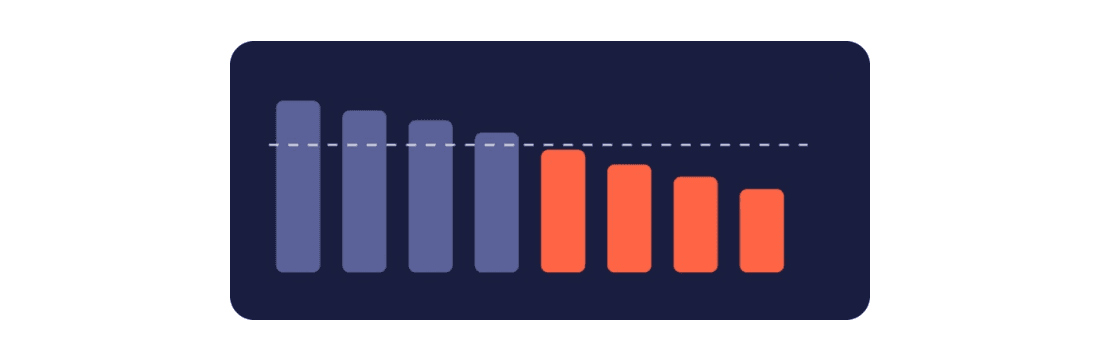
- Above 89%. Where elite teams keep PR maturity, in LinearB's 2026 Software Engineering Benchmarks Report.
- Below 77%. Needs focus. Pull requests are opening before they're ready, and reviewers spend their time on rework instead of review.
Change it
Match review depth to risk. Decide which changes need human judgment, such as architectural calls and security-sensitive paths, and let AI code reviews in LinearB take the first pass on the rest.
Check it worked
Ask again next month. PR readiness holds steady or climbs, and your most senior reviewers take on a smaller share of routine reviews.
What to do next: run Playbook 1 (review load) and Playbook 5 (unplanned work) on the teams in the Very low band.
Download your free copy of the guide
Turn the playbooks into a weekly health check
Run the six playbooks on a schedule and you have one view for your leadership team: who is carrying review, how long agent work waits and where the hours are spilling. Share it where your leaders already work, and drill into any flagged team to see the pull requests behind it. The four signals the playbooks read are explained in four signals your team is absorbing AI's hidden cost.
Six playbooks, two rhythms
- Every week: Playbook 1 (review load), Playbook 2 (agentic vs. manual wait time), Playbook 3 (weekend work).
- Every month: Playbook 4 (reviewer coverage), Playbook 5 (unplanned work), Playbook 6 (PR readiness).
Connect the LinearB MCP server in three steps
- Add
https://mcp.linearb.io/mcpas a custom connector in your MCP client. Claude, Cursor, VS Code, Codex and others connect the same way. - Sign in to LinearB and approve access when prompted. Clients without OAuth can use a LinearB API key instead.
- Ask the playbook questions. Answers respect your existing LinearB permissions.
The Model Context Protocol (MCP) is an open standard for connecting AI assistants to external systems. For a walkthrough of the connection and example prompts, see using the MCP server with Claude and exploring the power of LinearB's MCP server.
What to do next: schedule Playbooks 1 to 3 for Monday morning and Playbooks 4 to 6 for the first Monday of the month, and post the answers to the channel your engineering leaders already read.
Frequently asked questions
What questions should I ask my engineering data?
Ask who carried the most review load this month, how long agentic pull requests wait for pickup compared with manual ones, which teams had the most weekend activity, which repositories depend on one or two reviewers, how much of each sprint was unplanned, and which teams had the biggest drop in PR readiness. Each question maps to a signal on the engineering health dashboard in LinearB.
How do I use the LinearB MCP server?
Add https://mcp.linearb.io/mcp as a custom connector in your MCP client, sign in to LinearB and approve access, then ask questions in plain language. Clients without OAuth can use a LinearB API key, and every answer respects your existing LinearB permissions.
How often should I run engineering health playbooks?
Run review load, agentic wait time and weekend work weekly, and run reviewer coverage, unplanned work and PR readiness monthly. Weekly playbooks catch pressure as it builds; monthly playbooks confirm whether a change held.
What is a good pickup time for agentic pull requests?
A good pickup time for agentic pull requests is one that matches your manual pickup time. According to LinearB's 2026 Software Engineering Benchmarks Report, agentic pull requests wait 5.3x longer than unassisted ones (17.6 hours against 3.4 hours at the 75th percentile), and the gap closes when every agent-authored pull request has a named human owner.
Can I run these playbooks without the MCP server?
Yes. Each playbook maps to a view on the engineering health dashboard in LinearB (reviewer imbalance, active on weekends, context switch and PR readiness), and Playbook 2 can run through the LinearB API on Business and Enterprise plans. The MCP server removes the step of opening the dashboard by bringing the answers into the session you already work in.
See how your people are holding up your software factory
The factory still has people on the floor, reading everything the machines produced overnight and answering for code they did not write. LinearB is the harness for your software factory: you see how they are holding up in the same place you see your delivery, and fix the process around them.
- Explore: ask your own data questions in plain language through the LinearB MCP server, starting with the playbooks in this guide.
- Measure: track the signals on the engineering health dashboard, live for every customer with Metrics Builder, and add developer surveys for what the numbers can't show.
- Act: take load off the people carrying it with gitStream routing and AI code reviews, then measure again to see what held.
You've built the factory. Now look after the people running it: book a demo, or start with the context layer your software factory needs.
